Leak Gopher Meter Reader
The Leak Gopher Meter Reader is a Z-wave sensors by Leak Intelligence, LLC. It works with Home Assistant.
Compatibility
Compatibility data may be incomplete. Useorto indicate whether it matches your experience.
Shop Leak Intelligence, LLC on Amazon
Browse current Leak Intelligence, LLC smart home products and deals on Amazon.
Featured Leak Intelligence, LLC devices
See all →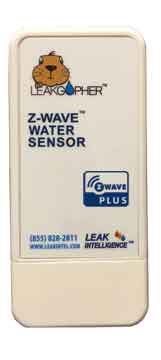
Setup instructions
How to Add the Leak Gopher Meter Reader to your Z-Wave Controller - Plug the wall cube power adapter (included) into the receptacle on the bottom of the Leak Gopher marked '12 VDC'. Plug the wall cube into a 110 VAC outlet. This provides power to the Leak Gopher. - Configure the Z-Wave Controller to Include/Add a device. - When the Z-Wave Controller is ready to include/add a device, it will display a message like 'waiting to add device'. Press Include/Add button on the front of the device. - The Include/Exclude button is the Z-Wave logo located on the front of the Leak Gopher Meter Reader. - Press the Include/Remove button. Depending on your controller you may have to press the button 3 times. - The Z-Wave Controller will acknowledge that the Leak Gopher Meter Reader has been added to the Z-Wave network. - Your Leak Gopher Meter Reader is ready to use.
Frequently asked questions
Does the Leak Gopher Meter Reader work with Home Assistant?
Yes — the Leak Gopher Meter Reader works with Home Assistant over Z-Wave via the Z-Wave JS integration. A Z-Wave controller is required.
What protocol does the Leak Gopher Meter Reader use?
The Leak Gopher Meter Reader communicates over Z-Wave.
Data: manual
← Back to results